
Car scanner for Android has revolutionized the way you diagnose problems in your vehicle. These apps connect to the car diagnostic system and identify defects in seconds, saving time and money in workshops.

Car Scanner ELM OBD2
CAR SCANNER LLC
Automotive diagnostic technology has evolved significantly in recent years, allowing vehicle owners to access complex information directly from their smartphone.You no longer have to rely solely on mechanics to understand what is happening to your car.
How Automotive Diagnostic Scanner Works
The car scanner for Android works by connecting a Bluetooth or USB adapter to the OBD-II (On-Board Diagnostics) port present in virtually all modern vehicles.This standardized connector is usually located under the instrument panel, near the steering wheel, and provides direct access to the car's electronic system. When you connect the adapter and open the application, it establishes direct communication with the vehicle's electronic control unit (ECU).
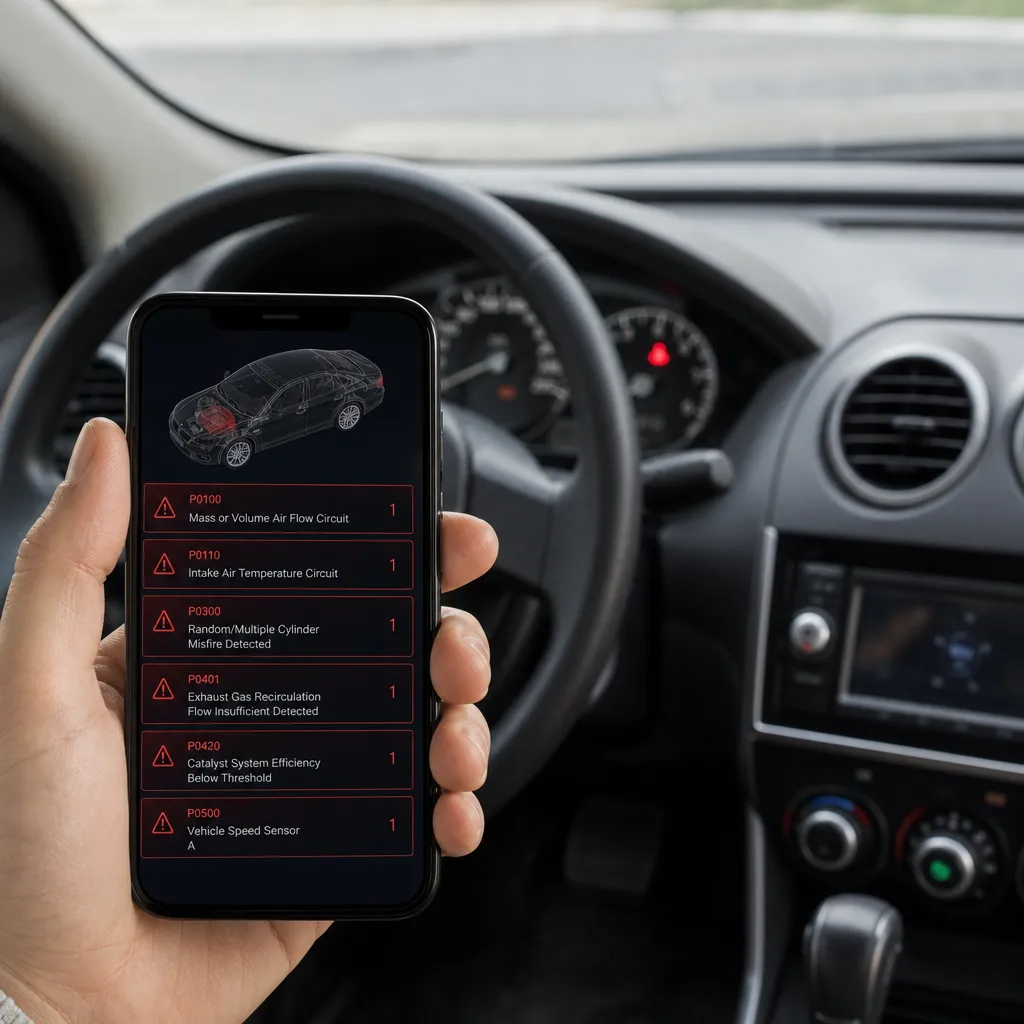
Once connected, the app sends specific commands to the ECU, requesting information about sensors, actuators and control systems. The car's computer responds by sending fault codes (DTCs) that indicate exactly which systems are experiencing problems. You receive real-time data such as engine temperature, fuel consumption, fan speed and status of each system, allowing a complete and accurate diagnosis.
The great advantage of this approach is that you get raw data from the car itself, not from assumptions or superficial checks. The application translates these technical codes into understandable language, explaining what each error means and suggesting possible causes and solutions.
Current Trends in Android Diagnostic Apps
The automotive diagnostics industry via smartphone is evolving rapidly, and the 2024 trends show a clear direction for greater artificial intelligence and connectivity. The most modern applications now use machine learning to recognize fault patterns specific to each brand and model, offering more accurate diagnostics than was possible a few years ago.
Cloud integration is another strong trend that you should keep up with. Many apps now automatically sync your diagnostic data with secure servers, allowing you to access the complete car maintenance history from anywhere. This creates a permanent and professional record of the vehicle status, extremely useful if you plan to sell the car or need to prove preventive maintenance.
Expanded compatibility with more brands is also present. While years ago you needed different apps for different manufacturers, modern solutions cover virtually all brands with a single application, saving space on your mobile and simplifying use. In addition, the connection speed has improved dramatically with the emergence of Bluetooth 5.0 adapters, which connect in seconds and maintain stable communication even in adverse conditions.
Best Practices in Using Android Scanners
Before you start any diagnosis, you should learn how to correctly interpret fault codes.A code like P0420 refers to the catalyst, but this does not necessarily mean that the catalyst is broken, it could be a malfunctioning sensor.Always research the specific meaning of the code in the context of your car before making repair decisions.
Establish a periodic check routine at least once a month, even without visible symptoms. This preventive practice allows you to identify early-stage problems before they become costly. You can detect sensors starting to fail, declining emission systems, or abnormal behavior patterns that indicate impending wear.
Document all the diagnostic history in one file or using the app's cloud function.Keeping a detailed log helps you identify trends over time and makes it easier to communicate with professional mechanics.When you take the car to a workshop with documented data, the mechanic saves time and can immediately focus on the real problem.
Never ignore safety system or emissions related fault codes. Although some errors are simple to resolve, others can affect engine performance or even make the car dangerous to drive.Codes related to brakes, airbag or power steering system always require professional attention, regardless of what the scanner indicates.
Calibrate your sensors regularly if the app offers this functionality.Dirty or uncalibrated sensors produce inaccurate readings that lead to incorrect diagnostics. You can significantly improve the accuracy of diagnostics by cleaning the oxygen, airflow and other critical points sensors as recommended by the vehicle manufacturer.
Advantages of Using App Diagnostics
Diagnosing your own car avoids diagnostic charges in workshops, which can range from fifty to two hundred reais depending on the establishment.You perform multiple diagnostics for free and maintain full control over when and how to investigate problems.
Instead of relying on the interpretations of a mechanic, you access the same information he uses, creating a basis for more balanced negotiation.You can confidently question repair recommendations based on real data from your car, and avoid unnecessary repairs that cost time and money.
You get complete transparency about the real state of the vehicle.Many owners buy used cars and do not know exactly what to expect, the scanner reveals the history of recorded failures and the pattern of engine use.This turns the purchase decision into something based on facts and not on promises from the seller.
Early detection of problems prolongs the life of the car significantly. A small problem identified today can be solved with simple and inexpensive maintenance, but ignored for months can turn into a costly breakdown that affects other systems. Scanners allow you to stay ahead of problems and plan maintenance expenses.
Diagnostic Limitations and Challenges via Android
You should understand that not every Android scanner offers equal functionality. Some apps only support basic diagnostics, reading fault codes, while others allow access to complete real-time data. Check exactly what features each app offers before relying solely on it for critical maintenance decisions.
Compatibility with different OBD-II protocols varies between manufacturers. Some cars use proprietary or modified protocols that certain adapters cannot read correctly. You may encounter situations where the app cannot establish full connection with your vehicle, yet still requiring a visit to the mechanic with professional equipment.
Misinterpretation of data is a real risk if you lack technical knowledge. A fault code can have several possible causes, and you could come to wrong conclusions that lead to unnecessary repairs. Generic codes like P0300 (random misfire) require professional analysis to identify the root cause among dozens of possibilities.
The quality of Bluetooth adapters varies enormously in the market.Cheap adapters of inferior quality offer unstable connections, inconsistent readings or even damage the OBD-II port of your car. Investing in a reliable brand adapter is essential, as a low-quality device completely compromises the usefulness of the diagnosis.
Selecting the Best Scanner for Your Needs
Start by identifying what type of diagnosis you really need. If you just want to read fault codes and clean up occasional errors, a basic free app may be enough. But if you are looking for continuous real-time analysis, data history and trends, you will need a premium solution with advanced features.
Research the reputation of the developer and the app in the user reviews. Read detailed reviews that explain real experiences with specific cars, not just generic stars. Users who share their car model provide the most valuable information about compatibility and reliability of the app.
Consider which OBD-II adapter you will use, as this influences both compatibility and overall reliability.Recognized Bluetooth adapts have better support, more frequent updates, and larger user communities.The choice of adapter is just as important as the choice of app, as an excellent app with a bad adapter provides frustrating results.
Make sure the app offers regular updates and active customer support. Developers who constantly improve their apps tend to offer better compatibility with new car models and faster bug fixes.You want an app that evolves with automotive technology, not something stagnant that will soon become useless.
Ensuring the Security of Your Data
The data collected by the scanners may include sensitive information about your vehicle, location of use and driving patterns. Choose reputable developer applications that explicitly protect your data with encryption and do not share information with third parties without permission.
Read the privacy policy before installing any app, especially those that offer cloud synchronization. Understand exactly what data is collected, how it is stored and who can access it. Some free apps charge for the absence of price by selling your usage data to manufacturers, insurers or traffic analysis companies.
Keep your smartphone safe when connected to the car, as the OBD-II connection provides deep access to electronic systems. Use strong passwords, keep the operating system and applications up to date, and avoid connecting to public WiFi networks when syncing car data.Simple digital security practices protect your vehicle from possible unauthorized access.
Integrating Android Diagnostics into Your Maintenance Routine
You can use the scanner as part of a structured preventive strategy.Create a schedule of checks: immediately after buying the car to establish a baseline, monthly during normal use, and whenever you notice any anomalous behavior.
Combine the scanner data with other routine maintenance information. When changing oil, also check the fault codes and fuel consumption.When it turns winter or summer, do a full check of the air conditioning system, heating and temperature sensors. An integrated approach uses all available tools to keep your car in perfect condition.
Communicate better with your mechanic by providing scanner data along with descriptions of symptoms. Rather than just saying "the car is not running well", you provide specific codes, parameter readings, and history of when the problem started.
Use the app to track the effectiveness of repairs after a maintenance. If the mechanic fixed a problem, check that the fault code has actually been solved and that the related parameters have returned to normal. You validate as soon as the work has been done correctly and can return if the problem persists.
FAQ - Frequently Asked Questions about Android Car Scanners
What is the difference between a free app and a paid one? Free apps typically offer basic fault code reading and error cleaning. Paid versions unlock real-time data access, historical graphics, specific sensor analysis, and priority support. You should start with a free app to evaluate compatibility, then consider upgrading if you need advanced functionality.
Is it safe to leave the OBD-II adapter permanently connected? Most modern Bluetooth adapters consume very little power when the car is off, functioning more like an always-available diagnostic meter. However, removing the adapter when not using it for long periods extends its life and reduces any theoretical risk of electronic interference, although proven cases of this are rare.
Can I completely rely on an app-based diagnosis for purchasing decisions? A scanner provides valuable information about the history of failures, but does not replace a thorough professional inspection.Use the app for initial investigation and identification of potential problems, then take the car to a trusted mechanic for a detailed physical evaluation before any major purchase.
Does the scanner damage the car in any way? No, as long as you use a quality adapter.The OBD-II port is designed for diagnostic access, and well-developed software only reads data or clears fault codes that have already been registered. Avoid apps that promise "performance optimization" or invasive features, as these can actually affect engine operation.
Which app do you recommend for beginners? Apps like Car Maint, Torque Free and Dash Command offer a good balance of simplicity and functionality for novice users. They have intuitive interface, active support communities and compatibility with most cars. Start with one of these and move on to more complex options if you need additional features.
Does the app data work with any car? Virtually all cars produced after 1996 have OBD-II port, but full compatibility varies. European, Asian and American cars generally work well, but some luxury vehicles and modified cars may use proprietary protocols.
Can I reset the check engine light on my own with the app? Yes, most apps allow you to clear fault codes and turn off the check engine light after diagnosis. However, you must address the cause of the code before simply cleaning it, or the light will reappear during the next scan cycle. Cleaning without repair of the underlying problem only temporarily masks the problem.
Conclusion
Car scanners for Android represent a fundamental change in how you manage the health and maintenance of your vehicle. These tools have transformed automotive diagnostics from a unique expert service into something accessible and understandable for any car owner.
The clear trend is that these technologies will become even more sophisticated, integrating artificial intelligence and predictive analytics to anticipate problems before they occur. You must stay up-to-date on these evolutions and adopt tools that align with your specific needs and level of technical knowledge.The combination of common sense, reliable scanner data and professional assistance when needed creates a balanced and effective approach to automotive maintenance.
Start today by purchasing a quality OBD-II adapter and choosing an application that aligns with your goals. Perform your first diagnosis, explore the available features and establish a consistent routine of verification. You will quickly realize how this technology saves money, time and worries, turning you into a more informed and secure car owner.


