
Have you ever imagined having an electronic mechanic in your pocket? Car scanner apps on Android have transformed the way we diagnose vehicle problems, allowing anyone to access complex technical information with a few taps on the screen. Vehicle diagnostic technology is now democratic and affordable, saving you time and money.

Car Scanner ELM OBD2
CAR SCANNER LLC
Before this mobile revolution, the only ones who could identify engine failures were the professionals in workshops, equipped with expensive and inaccessible devices for the average citizen. Today, a simple Android scanner application connects to the OBD-II port of your vehicle and provides accurate diagnostics on problems that could develop silently. This change represents not only convenience, but also empowerment of the car owner in preventive maintenance.
How Car Scanner Apps Work
These applications use the OBD-II interface, a mandatory standard in modern vehicles since 1996 in the US and 2001 in Europe. The wireless scanner physically connects to this port, usually located below the instrument panel, and communicates via Bluetooth with your Android smartphone. The connection is secure and does not interfere with the operation of the vehicle, functioning only as a data reader already present in the car computer.
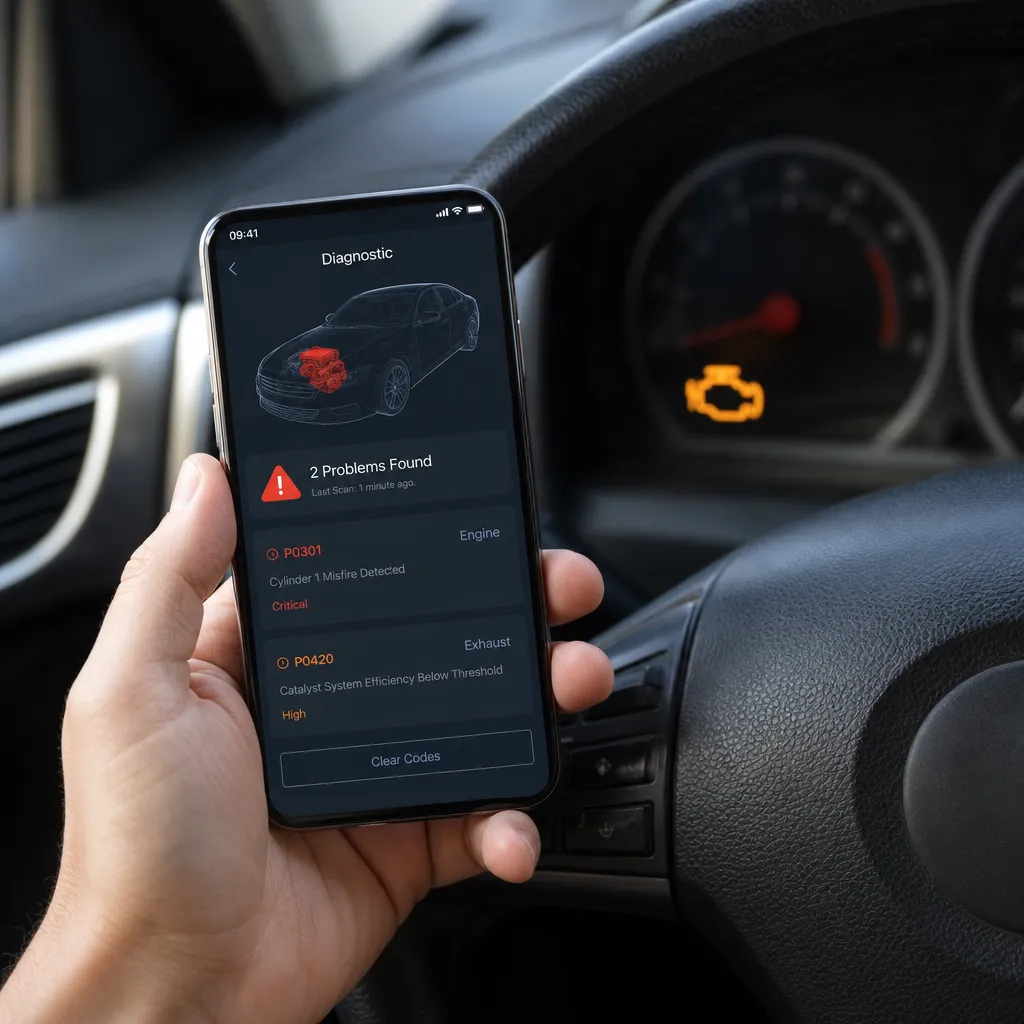
The application interprets the error codes (DTCs) that the vehicle diagnostic system stores permanently. When a sensor fails or a system works outside the normal parameters, the car computer records this information. You receive alerts in real time, being able to monitor engine temperature, fuel consumption, revolutions per minute and dozens of other critical parameters. This allows you to identify problems before warning lights turn on the panel.
Advantages of Using an Android Scanner to Diagnose Problems
The financial savings are immediate when you detect early problems. A small flaw in a sensor detected by the application costs $ 200 to repair, but ignoring this failure can damage the catalyst, costing $ 3,000. The smartphone puts you in full control of the health of your vehicle, without relying on appointments in workshops or blindly rely on third-party diagnosis.
In addition to the economy, you gain transparency in maintenance. When you take the car to the workshop, you can tell exactly what error code was detected, preventing unnecessary repairs that some establishments charge without real need. Many owners report that simply having the application installed encourages them to take better care of the vehicle, performing preventive maintenance before problems become critical. The application also records complete history of readings, showing the evolution of problems over time.
Essential Checklist: Your Practical Guide with Android Scanner
Develop a monitoring routine using this practical checklist that you can tailor to your vehicle and specific needs. Do this regularly and note how you identify problems long before they cause more serious structural or functional damage to the automobile.
First, consider these key items in your diagnostic checklist:
Initial Preparation: Make sure the OBD-II adapter is in perfect condition; confirm that your smartphone's Bluetooth is on; make sure the app is up to date with the latest diagnostic versions; test the connection in a safe, parked place before running. Perform this check once a month or before long trips.
Reading Error Codes: Open the application and connect to the adapter; wait for full synchronization before any action; note all displayed codes, especially those prefixed with "P" (powertrain) that indicate engine problems; differentiate between pending and confirmed errors, as pending ones can be intermittent. Set aside 5 minutes for this check.
Monitoring Critical Parameters: Track the temperature of the coolant and do not let it pass 100°C; observe the oxygen sensor (lambda probe) to check efficient combustion; monitor the MAF values (air flow) that should be between normal values for your model; control the fuel pressure that should remain constant.
History and Standards: Record readings in a notebook or digital file; compare current readings with those from the previous month; identify gradual degradation patterns; note if errors reappear after code cleaning.This documentation proves invalid when taking the car for professional diagnosis.
Diagnostic-Based Corrective Actions: If you detect error P0101 (MAF), clean the sensor with compressed air before repairing; if you see P0300 (random misfire), check candles and cables; if you find P0440 (EVAP), look for leaks in the fuel system; do not ignore emissions-related codes that affect the environment and performance. Consult a professional if the error persists after cleaning.
Different Types of Scanner Apps Available
The market offers options for all levels of experience and budget. There are completely free applications that provide basic code reading, ideal for those who are starting and want to save. Freemium model applications charge for advanced features such as real-time monitoring or history recording, costing between R $ 20 and R $ 100 per year. Professional software type monthly subscription offer direct technical support and constant updates for new car models.
The quality varies significantly between options. Some applications have confusing interface and offer few explanations about the codes found, leaving you not knowing what to do. Others present detailed explanations in Portuguese, video demonstrations and integration with communities of owners of the same car model. Before choosing, read real reviews of users who drive the same vehicle as you, because compatibility is not guaranteed for all Brazilian cars.
Choosing the Correct OBD-II Adapter for Android
It is not enough to have a good application if the physical adapter does not work properly. Bluetooth adapters are the most popular for Android, offering stable connection and consuming little battery of the smartphone, costing between R $ 80 and R $ 400 depending on the brand. There are also WiFi adapters that work on local networks, useful if you do not want to use Bluetooth, although they consume more battery. Some Brazilian vehicles of Asian brands require specialized adapters to work properly.
Check compatibility rigorously before buying, as not every adapter works with all cars.Reliable brands like Konnwei, OBDLink and Vgate often have better compatibility with domestic models and technical support available in English. When you receive the adapter, test immediately at home to confirm that it connects and works before trying to diagnose real car problems. An adapter of dubious quality can cause incorrect readings, leading you to unnecessary repairs.
Common Problems Scanner Detects in Brazil
Incomplete combustion is one of the most frequent diagnoses in Brazilian cars, often related to the use of fuel alcohol that burns differently from gasoline. You will receive codes such as P0171 (Very rich system) or P0172 (Very poor system), indicating that the air-fuel ratio is not balanced.Dirty sensors or clogged injectors cause these problems, resolvable with preventive cleanings before they damage the catalyst.
Intermittent failures in the starter system affect many Brazilian vehicles, especially the oldest still in circulation. The application can detect P0300 (Random combustion) that causes difficulty in starting or lack of power during acceleration. Oxidized spark plug cables, weakened ignition coil or problems with temperature sensors cause this. Diagnosing this early allows you to replace only the defective component, avoiding complete replacement of the ignition system.
Leaks in the emissions system also appear frequently, generating P0440 or P0455 codes especially in vehicles with several years of use. This detection is critical because it affects the approval in the environmental inspection of some states. The scanner allows you to locate the specific leak before taking to the workshop, saving expensive diagnosis that some establishments charge separately. Loose pipes or valid canister damaged are often to blame.
Interpreting Error Codes and Making Right Decisions
Not every error code requires immediate intervention, and understanding the difference between critical issues and early warning avoids unnecessary repairs. Codes prefixed with P0 (powertrain) related to engine and transmission are generally more critical than B (body) or C (chassis) codes. A P0420 (Deficient catalyst) requires immediate attention as driving too long with a problem on the catalyst can permanently damage it. In contrast, a B1234 (Comfortable Sensor) can wait weeks without impairing safety or performance.
Learn to differentiate between red urgency light and yellow warning light through your app. Critical errors like brake, airbag or engine issues should be resolved before continuing to drive.Moderate errors like oxygen sensor or EVAP system allow you to drive carefully until you find workshop for repair. The ideal app offers this context, sorting errors by severity and explaining consequences of ignoring them.
Practical Tips to Maximize Scanner Use
Clean the error code only after fixing the problem, otherwise the code reappears confirming that the diagnosis was correct. Many owners complain that the code keeps appearing after "cleaning", but in fact, the problem has never been solved. Write down the exact code before cleaning, so you have clear evidence if it returns. The application allows you to monitor in real time if the problem was actually solved driving a few kilometers after repair.
Use real-time monitoring while driving on known routes, observing how parameters change during acceleration, braking or gear shifting. This practice reveals intermittent problems that do not generate permanent codes, helping to locate electrical faults or problematic sensors. Record abnormal behavior (sputtering at a certain rotation, hesitation when accelerating) and correlate with parameter readings, creating a holistic diagnosis of the problem.
Share your data with professionals before taking the car to the workshop. Many mechanics appreciate owners who arrive with organized technical information, as it saves diagnostic time that would be charged separately. You save at the time of repair and establish a relationship of trust with the professional, showing that you are actively involved in maintenance. This transparency also reduces the margin for fraudulent repairs that some workshops try to do with uninformed owners.
Frequently Asked Questions About Android Scanners
Will the scanner damage my car? Absolutely no. The application only reads data that the car computer already has, without sending commands that change operation. The OBD-II connection is completely safe and used for decades by professionals globally without reporting damage. You can leave the adapter connected during a whole trip without any risk.
What is the difference between pending and confirmed code? A pending code means that the sensor has detected an abnormality in a driving cycle, but it can be false positive caused by vibration or interference. A confirmed code has appeared in multiple cycles, indicating genuine problem that requires attention.
Does it work on all Brazilian cars? Cars manufactured after 1996 have mandatory OBD-II port, but the quality of implementation varies by manufacturer. Asian cars usually have better compatibility than European. Before buying the adapter, check with users of your specific model if it works correctly in Brazil.
Do I need technical knowledge to use? The app is designed for laymen, but understanding the basics of automotive operation helps with interpretation. Most good apps offer clear explanations of each code and how to solve it. Start by reading about the car itself before using the scanner.
How long does a full reading last? A basic code reading takes 30 seconds to 2 minutes depending on the application and adapter. A full readout with real-time monitoring of all sensors can take 10 to 20 minutes. You control the duration by setting which parameters you want to monitor.
Conclusion: Taking Control of Your Vehicle's Health
A car scanner app on Android is more than a diagnostic tool, it is an investment in the financial health of your vehicle. The ability to identify problems before they become expensive represents real savings of thousands of dollars over the life of the car. You stop blindly trusting workshops and start to actively participate in maintenance decisions, as it should be.
Implementing the practical checklist provided in this article, you create a monitoring routine that detects gradual degradation long before warning lights turn on. Small faults are corrected by dozens of dollars while still not causing cascade damage.
The initial investment in a quality OBD-II adapter and a good application (between R$ 150 and R$ 400) is paid for the first maintenance you avoid or scale correctly. You recover this investment often in saving unnecessary repairs and early detection of expensive problems.Do not leave more for tomorrow, start today to monitor your car using the technology that is in your hand.


